Close Menu
Busnese.com :: Business Tips,  Advice And Resources
  • Startup & Grow Business
  • Business Tech
  • Business Resources
  • Business Tips
  • Finance
  • Sales & Marketing
  • Business Tools
    • My QuickBooks Tool
    • Free Business Loan Calculator: Monthly/Years Payments & APR
    • Gross Profit Margin Ratio Calculator
    • Free Markup Calculator
    • Business Valuation Calculator – Find What Your Business Is Worth
Facebook X (Twitter) Instagram
Thursday, October 15
Latest Contents:
  • AI Policy for Employees: A Practical Guide for Small Businesses
  • Invoice Payment Terms for Small Business: How to Get Paid on Time
  • Validate a Business Idea Before You Spend Money
  • Sales Proposal Template: How to Write One That Gets a Clear Decision
  • Quarterly Estimated Taxes: A Practical Guide for Freelancers and Small-Business Owners
Busnese.com :: Business Tips,  Advice And Resources
Facebook X (Twitter) Instagram
  • Startup & Grow Business
  • Business Tech
  • Business Resources
  • Business Tips
  • Finance
  • Sales & Marketing
  • Business Tools
    • My QuickBooks Tool
    • Free Business Loan Calculator: Monthly/Years Payments & APR
    • Gross Profit Margin Ratio Calculator
    • Free Markup Calculator
    • Business Valuation Calculator – Find What Your Business Is Worth
Busnese.com :: Business Tips,  Advice And Resources
Home » My QuickBooks – Free Online Accounting Tool

My QuickBooks – Free Online Accounting Tool

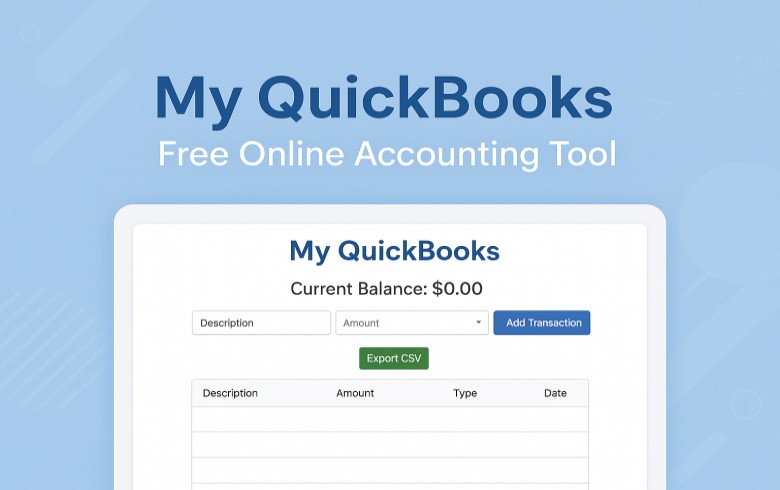
My QuickBooks – Free Online Accounting Tool is a simple yet powerful web-based accounting solution designed for individuals and small businesses.

This tool allows you to seamlessly manage your financial transactions by tracking income, expenses, and calculating your balance in real time.

Features include adding detailed transactions, viewing summaries, and generating financial reports with options to save them as a CVS File directly. Perfect for anyone looking for a quick and efficient way to stay on top of their finances!

My QuickBooks Tool
Current Balance
$0.00
Total Income
$0.00
Total Expenses
$0.00
Transactions
0
Add New Transaction
Type
Date
Description
Amount ($)
Category
Last 6 months
Income Expense
Spending by category
Total Income
$0.00
Total Expenses
$0.00
Net Balance
$0.00
My QuickBooks

How to Use My QuickBooks

  1. Enter Description – e.g., “Freelance Payment” or “Groceries”.
  2. Enter Amount – Type the number (e.g., 150).
  3. Select Type – Choose Income or Expense.
  4. Click “Add Transaction” – It updates your balance and history.
  5. Export Data – Click Export CSV to download your transactions.

That’s it ! simple and fast accounting at your fingertips!

Frequently Asked Questions

Q1: Is My QuickBooks really free to use?
Yes, it’s 100% free with no signup required.

Q2: Can I save my data?
Yes, your data stays in your browser using local storage (or export it as CSV).

Q3: Can I track both income and expenses?
Absolutely! You can add both types of transactions and view your balance instantly.

Q4: Can I use this tool on my phone or tablet?
Yes, it’s fully responsive and works great on mobile devices.

Q5: How can I back up my transactions?
Use the Export CSV button to download your data anytime.

Latest Posts

AI Policy for Employees: A Practical Guide for Small Businesses

October 15, 2026

Invoice Payment Terms for Small Business: How to Get Paid on Time

October 14, 2026

Validate a Business Idea Before You Spend Money

October 13, 2026

Sales Proposal Template: How to Write One That Gets a Clear Decision

October 12, 2026
Busnese.com :: Business Tips,  Advice And Resources
Facebook X (Twitter) Instagram Pinterest
  • Home
  • Content Guidelines
  • Privacy And Policy
  • Sitemap
  • About us
  • Contact us
© 2026 www.busnese.com. All Rights and Reserved.

Type above and press Enter to search. Press Esc to cancel.